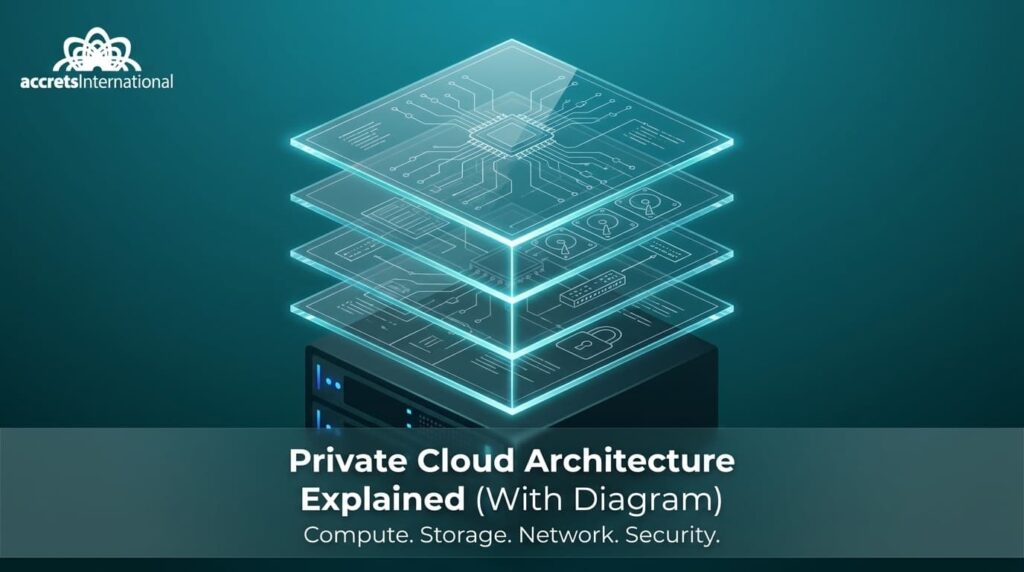

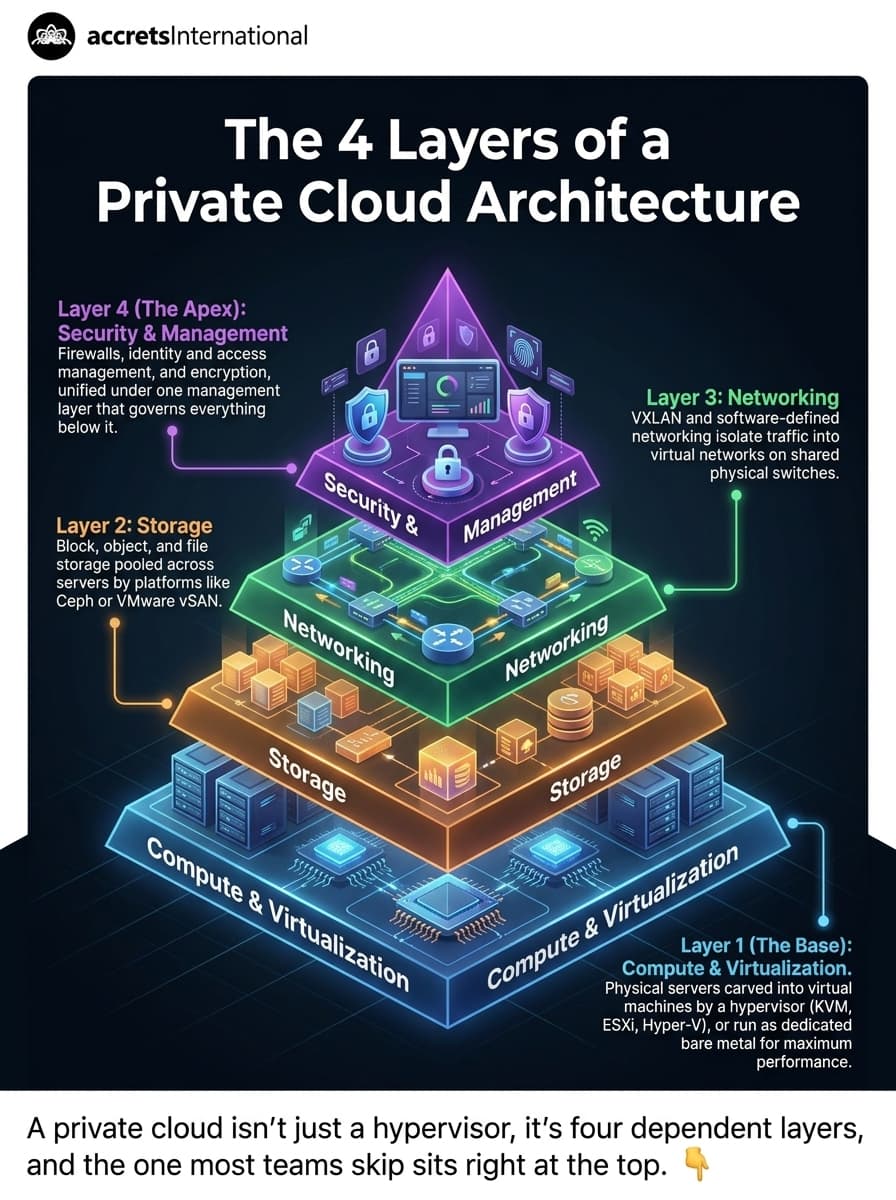
Private cloud architecture is a dedicated cloud computing environment built for one organization. The diagram below usually maps it as four connected layers: compute and virtualization, storage, networking, and security and management, whether the environment sits on-premises or with a third-party provider.
TL;DR
- Private cloud architecture dedicates compute, storage, network, and security infrastructure to a single organization.
- The architecture diagram breaks into four layers: virtualization/compute, storage, networking, and security/management.
- Deployment options include on-premises, hosted, and fully managed private cloud.
- OpenStack removes per-core licensing costs. VMware Cloud Foundation is more turnkey but moved to subscription pricing in 2024.
- Regulated industries such as finance, healthcare, and government adopt private cloud most, mainly for compliance and data control.
- The biggest operational risk is usually an untested disaster recovery plan, not the technology itself.
What is private cloud architecture?
Private cloud architecture is the design behind a cloud environment reserved for a single organization. The hardware, virtualization layer, storage, and network paths are not shared with other tenants, unlike public cloud.
According to the National Institute of Standards and Technology (NIST SP 800-145, 2011), a private cloud is provisioned for exclusive use by a single organization, whether that organization owns and operates the infrastructure itself, or a third party does it on their behalf.
That one detail, exclusive use, is what separates every decision that follows: cost, scaling speed, and how much control you keep over compliance. Most teams comparing options eventually work through the trade-offs between dedicated and shared infrastructure in a full private cloud vs. public cloud comparison, since the two rarely compete on the same axis.
The 4 layers of a private cloud architecture diagram
Compute and virtualization
The compute layer is where physical servers get carved into multiple virtual machines. A hypervisor is the software that does the carving. It sits between the hardware and the VMs, handing out CPU, memory, and I/O to each one.
Three hypervisors show up in most private cloud diagrams: VMware ESXi, Microsoft Hyper-V, and KVM, the open-source option most OpenStack deployments run on. The choice isn’t cosmetic. It decides licensing costs, migration paths, and how much of the stack you can inspect or modify yourself.
Bare metal is the other option at this layer. A bare metal server runs a single workload directly, with no hypervisor in between: full performance, no ability to split it into smaller pieces. High-performance databases and latency-sensitive applications tend to land here instead of on a VM.
Storage
Storage in a private cloud diagram usually splits three ways: block storage (iSCSI, Fibre Channel) for databases and VMs needing low latency, object storage (S3-compatible) for backups and unstructured data, and file storage (NFS, SMB) for shared access across users.
Ceph and VMware vSAN are the two platforms that show up most often underneath these, pooling raw disks across servers into one manageable layer instead of managing each server’s drives separately. Get this tier wrong and it drags down everything above it. This is usually where organizations standardizing their private cloud software stack start, since it’s the layer most tightly coupled to performance complaints.
Networking
The network layer connects everything above it, and increasingly it’s software, not hardware, doing the routing. VXLAN is the protocol most private clouds use to build isolated virtual networks on top of shared physical switches. It wraps traffic in an extra header so thousands of separate networks can run over the same cables without seeing each other.
VLANs do something similar at a smaller scale, 4,094 networks maximum, which is why larger private clouds have mostly moved to VXLAN instead. Software-defined networking (SDN) sits above both, letting administrators define network policy without reconfiguring physical switches every time something changes.
Security and management
Security here isn’t one control. It’s a stack: firewalls filtering traffic at the perimeter, identity and access management (IAM) governing who can touch what, and encryption protecting data at rest and in transit.
Management tools sit above all of it, giving administrators one place to provision resources and enforce policy instead of touching four different consoles. Teams in Singapore weighing multicloud exposure against these controls can check a Singapore-first approach to multicloud security for which controls matter at which layer.
Private cloud deployment models: on-premises, hosted, and managed
Private cloud architecture isn’t locked to one physical setup. Three deployment models cover most real-world implementations. The cloud vs on-premise TCO comparison covers the cost side of choosing between them.
- On-premises private cloud runs in your own data center, on your own hardware, managed by your own team. You keep full control, and full responsibility for every patch, failure, and capacity upgrade.
- Hosted private cloud moves the hardware into a third-party facility. You keep tenant isolation, but you no longer maintain generators, cooling, or physical security. That distinction matters more once you compare colocation against fully managed cloud, rather than assuming the two are interchangeable. This is also where data center tier ratings start to matter: according to the Uptime Institute, a Tier III-rated facility is concurrently maintainable, so equipment can be serviced without a shutdown. The 99.982% availability figure often quoted for Tier III is a benchmark rather than a guarantee, and a fair baseline to check any hosted or managed provider against.
- Managed private cloud goes further. A provider handles the hardware, the virtualization layer, patching, and monitoring, leaving your team to focus on applications instead of infrastructure. A fully managed on-premises private cloud is possible too: the provider designs and operates the environment, but it stays physically inside your own facility.
Choosing a private cloud platform
The layers above stay the same regardless of platform. What changes is who builds them and what it costs.
OpenStack is the open-source option. It’s matured well past its early reputation for being hard to run: better tooling and documentation have closed a lot of that gap, and it removes the per-core licensing that comes with commercial platforms. It’s worth understanding how OpenStack’s components actually fit together before comparing it against anything else, since the architecture looks unfamiliar coming from VMware.
OpenStack follows a six-month release cycle. The current series is 2026.2 Hibiscus, released on 30 September 2026, and releases.openstack.org lists which series are still maintained. Our guide to an OpenStack private cloud covers when it fits and when it does not.
VMware Cloud Foundation is the commercial default most enterprises already run. Broadcom’s 2024 licensing changes moved most customers from perpetual licenses to subscription bundles, and for a lot of IT teams that single change is what put VMware alternatives on the roadmap for the first time.
Nutanix sits in between: a commercial hyperconverged platform, generally easier to run than raw OpenStack but with less room to customize.
Teams leaning towards the open-source route can read the open source private cloud architectural blueprint and TCO alongside this comparison.
| Platform | Cost model | Vendor lock-in | Operational complexity |
| OpenStack | Open-source, no per-core fees | Low | Higher without in-house expertise |
| VMware Cloud Foundation | Subscription bundles (post-2024) | High | Lower, mature tooling |
| Nutanix | Commercial licensing | Medium | Lower, opinionated stack |
None of these decisions need to happen without a fallback plan. A structured migration off VMware that runs the old and new environments in parallel before cutover is usually what makes moving to OpenStack realistic instead of risky.
Private cloud vs. public cloud vs. hybrid cloud
Private cloud solves for control. Public cloud solves for elasticity. Most enterprises don’t pick one. They end up running both.
| Private cloud | Public cloud | Hybrid cloud | |
| Security | Dedicated, most control | Shared responsibility model | Split by workload sensitivity |
| Scalability | Limited to provisioned capacity | Near-unlimited, on demand | Public cloud absorbs overflow |
| Cost | Higher upfront, predictable | Pay-as-you-go, variable | Mixed |
| Best for | Regulated or latency-sensitive workloads | Variable-demand workloads | Both, split by requirement |
The pattern that shows up most in practice: sensitive data and core transaction systems stay on private cloud, while customer-facing traffic that spikes unpredictably runs on public cloud. Teams building this out across Singapore and the region tend to start from a hybrid cloud provider comparison, rather than architecting the split from scratch.
Why businesses choose private cloud
Three industries account for most private cloud adoption, and the reason is the same in each case: regulatory exposure.
Financial institutions use private cloud to keep transaction data under direct control while meeting MAS and PCI-DSS requirements, though private cloud infrastructure supports compliance rather than guaranteeing it on its own. The controls built on top of it still matter. A closer look at cloud requirements specific to financial institutions in Singapore and Southeast Asia covers what that actually involves.
Healthcare providers isolate patient data for the same reason. Government agencies do it for data sovereignty. None of the three are choosing private cloud because it’s newer. They’re choosing it because audits ask direct questions about where data physically sits.
Private cloud risks and how they’re usually mitigated
Private cloud isn’t risk-free. Three problems come up repeatedly.
- Cost. Hardware gets provisioned upfront in fixed increments, so underestimating capacity means paying for an expansion project later, and overestimating means paying for idle servers now.
- Skills gap. Running OpenStack or vSphere well requires people who actually know the platform, a shortage that’s part of why managed private cloud exists as a category at all.
- Untested disaster recovery. This is the one that gets discovered at the worst possible time. A DR runbook that’s never been rehearsed is a document, not a plan. Building and testing a backup and disaster recovery plan that actually restores data when it matters is what closes this gap, and it’s usually delivered as DR-as-a-service rather than built in-house from scratch.
Where to go from here
Private cloud architecture isn’t a single decision. It’s four layers, three deployment models, and at least two viable platforms, each with a different cost and control trade-off. The diagram at the top of this article is the shortcut. The sections underneath it are the detail worth reading before committing hardware or budget to any one path.
If you’re weighing OpenStack against a VMware renewal, or trying to work out what a managed private cloud would actually cost for your environment, talk to an infrastructure specialist. One conversation is usually enough to see what it looks like for your specific setup.
FAQ
What are the core layers in a private cloud architecture diagram?
A private cloud architecture diagram typically shows four layers: compute and virtualization (physical servers plus a hypervisor like KVM, ESXi, or Hyper-V), storage (block, object, and file storage pooled by platforms like Ceph or vSAN), networking (VXLAN or SDN routing traffic between virtual networks), and security and management (firewalls, IAM, and the tools administrators use to provision and monitor everything above it).
What’s the difference between bare metal and virtualized private cloud?
Bare metal means a physical server runs one workload directly, with no hypervisor in between: full performance, no ability to split it into smaller virtual machines. Virtualized private cloud uses a hypervisor to divide physical servers into multiple VMs, trading some performance overhead for the flexibility to run many workloads on shared hardware.
How does VXLAN work in private cloud networking?
VXLAN wraps network traffic in an additional header, letting thousands of isolated virtual networks run across the same physical switches without seeing each other’s traffic. It replaces the older VLAN standard, which caps out at 4,094 networks, a limit large private clouds outgrow quickly.
What’s the NIST definition of private cloud computing?
NIST SP 800-145 defines private cloud as infrastructure provisioned for exclusive use by a single organization, whether that organization owns and operates it directly or a third party manages it on the organization’s behalf. The defining feature is exclusive use, not who owns the hardware.
OpenStack vs. VMware Cloud Foundation, which is better for private cloud?
Neither is universally better. The choice depends on licensing budget and in-house expertise. OpenStack removes per-core licensing costs but needs more internal skill to operate well. VMware Cloud Foundation is more turnkey but moved to subscription-based licensing under Broadcom in 2024, which is the main reason many enterprises are actively evaluating alternatives.
Is there a private cloud architecture diagram template available?
A generic template rarely fits, since the right layout depends on your chosen hypervisor, storage platform, and network design. The diagram at the top of this article shows the four-layer structure most templates follow. Swap the hypervisor, storage platform and network design for whichever stack you run.
What’s a real-life example of private cloud architecture?
A bank running core transaction systems on dedicated, on-premises hardware for compliance, while using public cloud for its customer-facing mobile app, is a common real-life private cloud setup. Healthcare providers and government agencies follow a similar pattern: sensitive data stays on private infrastructure, and lower-risk workloads move to shared or public cloud.

Dandy Pradana is an Digital Marketer and tech enthusiast focused on driving digital growth through smart infrastructure and automation. Aligned with Accrets’ mission, he bridges marketing strategy and cloud technology to help businesses scale securely and efficiently.