
Cloud computing converts unpredictable capital expenditure into a predictable monthly operating cost, while on-premise gives your organization full control over hardware, data, and security. For most businesses in 2026, neither model is used exclusively a hybrid architecture that places sensitive workloads on-premise and scalable compute in the cloud delivers the best of both.
This guide walks through the real numbers, the decision framework, and the APAC-specific considerations your board presentation actually needs. Stay with us to the end and you will have everything required to make this call with confidence.
TL;DR
- Cloud = OpEx, flexible, lower Year 1 cost, shared security responsibility
- On-premise = CapEx, full control, better for stable workloads and regulated data
- 5-year cloud TCO for a 50-150 user organization: $350,000 to $820,000
- 5-year on-premise TCO for the same profile: $553,000 to $1,138,000
- Most APAC enterprises in 2026 run hybrid architecture, not one or the other
- Data sovereignty laws in Singapore, Indonesia, and across the region directly affect which model you can use for regulated data categories
What Are We Actually Comparing?
Before the numbers, a clean baseline.
On-premise means your organization owns and operates its own IT infrastructure, servers, storage, networking equipment, housed in your facility or a co-location data center. Your IT team manages everything: hardware procurement, software patching, security monitoring, and capacity planning. You have full control. You also carry full responsibility.
Cloud computing means a third-party provider hosts your infrastructure and you access it over the internet. You pay for what you consume, typically on a monthly subscription or usage-based model. The provider manages the underlying hardware; you manage what runs on top of it.
Understanding the fundamentals of cloud computing matters here because the model is not just a hosting decision. It is a fundamental shift in how your organization acquires, consumes, and accounts for IT capacity. That shift has direct implications for your balance sheet, your tax treatment of IT spend, and your organizational risk profile.
The Side-by-Side Reality Check
| Dimension | On-Premise | Cloud |
| Cost Model | CapEx — large upfront capital investment | OpEx — recurring monthly subscription |
| Control | Full — you own and configure everything | Shared — provider manages infrastructure layer |
| Scalability | Hardware-limited — requires procurement cycles | Near-instant, on-demand |
| Security Ownership | 100% in-house | Shared responsibility model |
| Compliance Verification | Directly auditable | Dependent on provider certifications |
| Staffing Requirement | Dedicated in-house IT infrastructure team | Reduced hardware ops; cloud architecture skills required |
Neither column is automatically better. The right answer depends almost entirely on what sits in the Cost Model and Staffing Requirement rows when you fill them in with your organization’s actual numbers, which is exactly what most cloud vs. on-premise articles never get to.
The TCO Breakdown Your CFO Will Actually Read
This is where most comparisons fail. They compare the cloud invoice to the hardware quote. That is not TCO, that is a vendor comparison. Real total cost of ownership includes every dollar your organization spends to keep infrastructure running, secure, compliant, and available.
On-Premise: What You’re Really Paying For
For a mid-size organization running a 3-to-5 server environment to support 50 to 150 users, the on-premise cost stack looks like this:
Year 1 (Capital and Setup)
- Server hardware: $35,000 to $75,000
- Storage and networking: $10,000 to $20,000
- Software licenses (OS, virtualization, security): $8,000 to $18,000
- Installation and configuration: $5,000 to $15,000
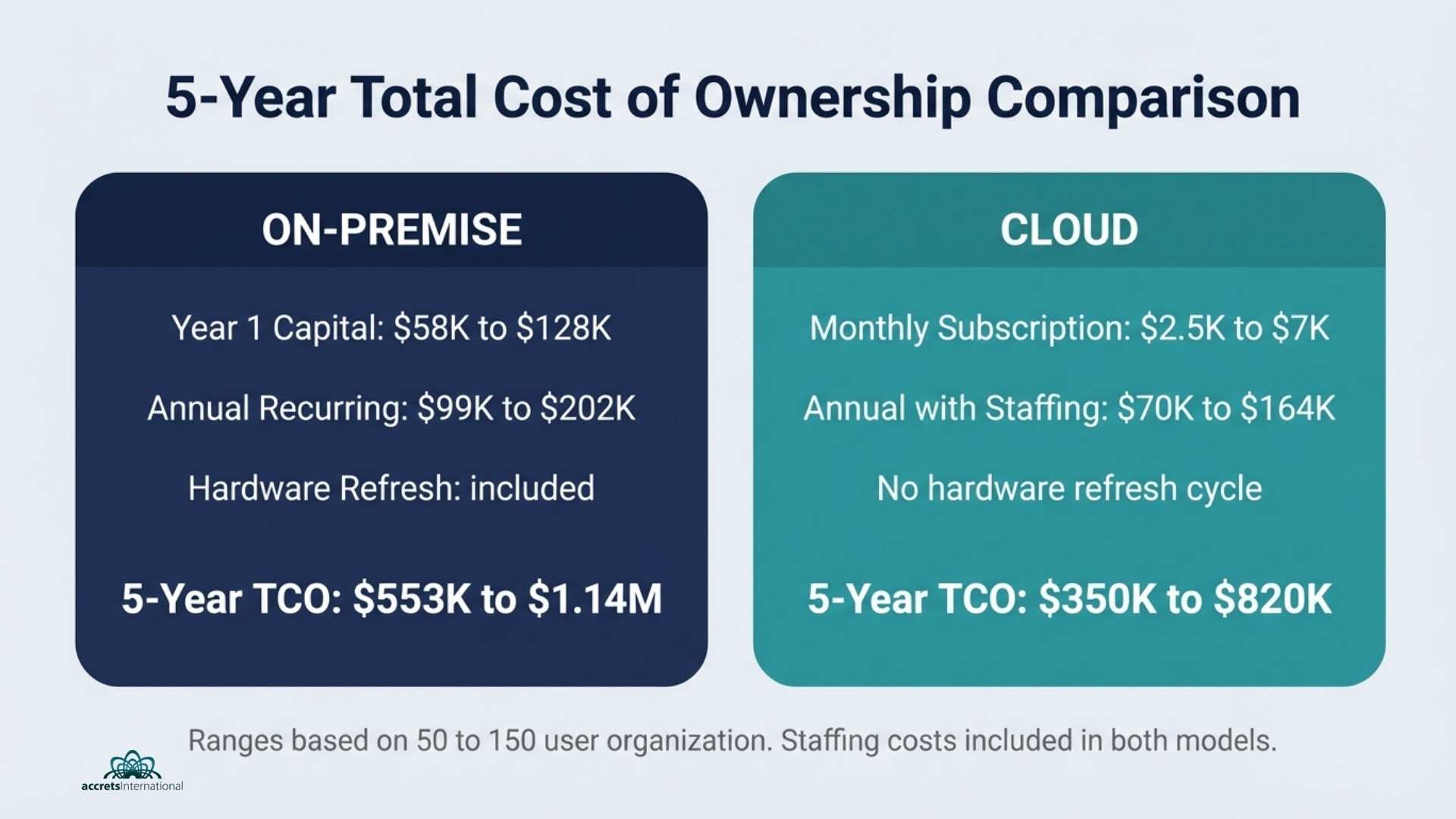
- Year 1 total: $58,000 to $128,000
Annual Recurring Costs
- IT staffing (1-2 dedicated infrastructure engineers): $80,000 to $160,000 per year
- Maintenance contracts and support: $8,000 to $15,000 per year
- Power and cooling (facility cost allocation): $6,000 to $15,000 per year
- Software renewals and patches: $5,000 to $12,000 per year
- Annual recurring: $99,000 to $202,000 per year
5-Year On-Premise TCO: $553,000 to $1,138,000 (including one hardware refresh cycle at year 3 to 4)
That staffing line is the number most on-premise cost models quietly omit. It is also the largest single variable, and one of the primary reasons IT infrastructure outsourcing in Singapore has grown significantly as organizations reconsider whether owning infrastructure also means owning the full staffing burden that comes with it.
Cloud: What You’re Really Paying For
For an equivalent workload (50 to 150 users, comparable compute and storage capacity):
Monthly Cloud Costs
- Compute (IaaS): $1,500 to $4,500 per month
- Storage: $300 to $800 per month
- Backup and disaster recovery: $400 to $1,000 per month
- Security and compliance tooling: $300 to $700 per month
- Monthly total: $2,500 to $7,000 per month
Annual Cloud Costs: $30,000 to $84,000 per year
Annual Staffing (Cloud Architecture and Management)
- Cloud management and optimization: $40,000 to $80,000 per year (in-house or managed service)
- Annual total with staffing: $70,000 to $164,000 per year
5-Year Cloud TCO: $350,000 to $820,000
The cloud wins on 5-year TCO for most mid-market organizations, but not by the margin the marketing materials suggest. The gap closes significantly when you factor in data egress fees (often overlooked), cloud waste from unoptimized resource allocation (industry estimates suggest 30 to 35 percent of cloud spend goes to unused capacity), and the cost of cloud architecture expertise.
Understanding the difference between platform and infrastructure as a service also matters here. Organizations frequently discover they are paying for IaaS flexibility they do not use when PaaS would serve their workloads more efficiently at lower cost.
The CFO’s One-Page Summary
Cloud wins on Year 1 cash outlay and flexibility. On-premise wins on predictability for stable, high-volume workloads over seven or more years. Hybrid architecture, which keeps specific workloads on-premise or in a private cloud while using public cloud for scalable, less-sensitive compute, wins on total optimization for most mid-to-large organizations.
Who Should Choose What: A Framework for Your Boardroom
Cloud Is the Stronger Choice When…
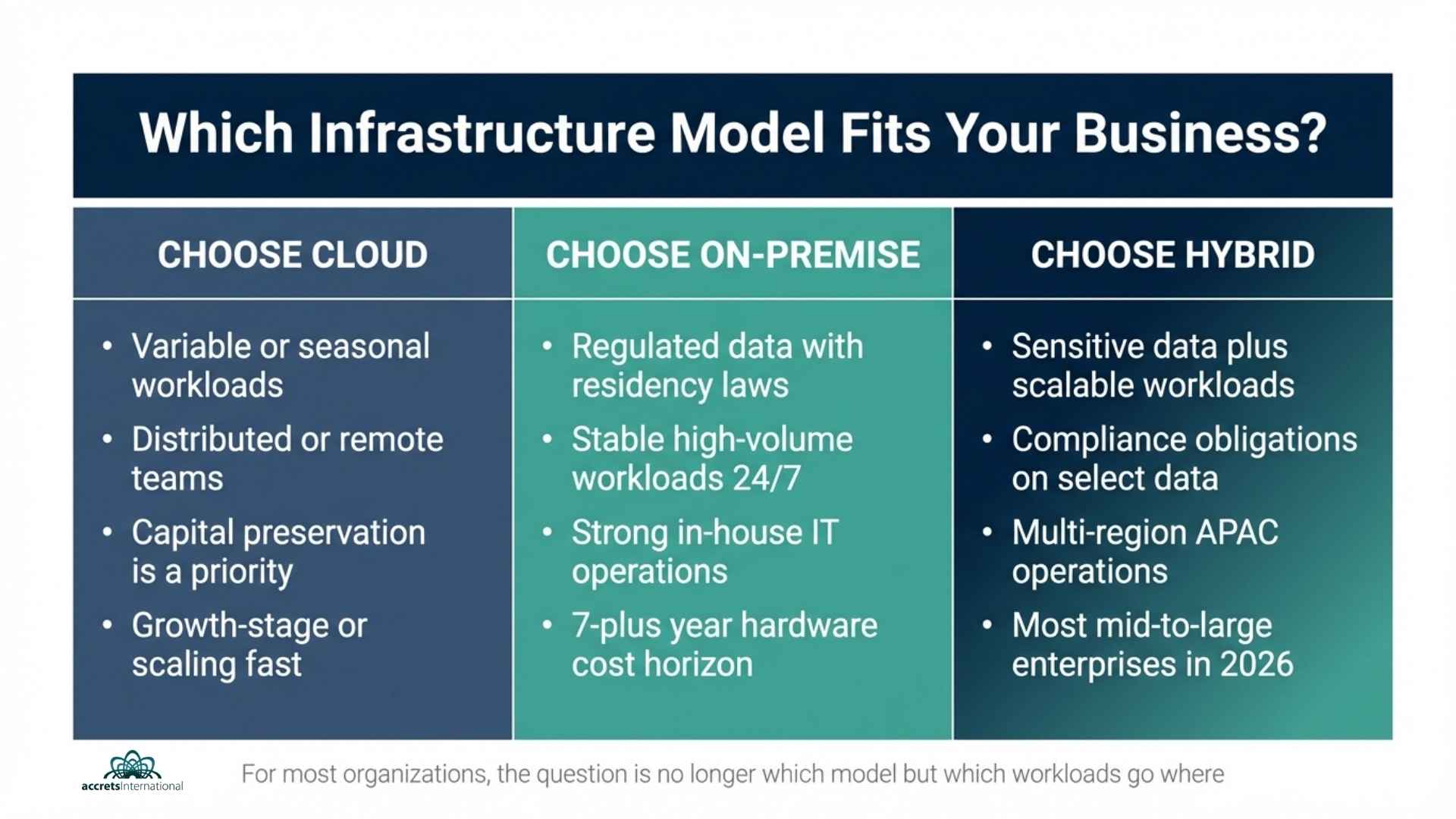
- Your workloads are variable. Seasonal demand, project-based compute, and growth-stage scaling all favor the pay-as-you-go elasticity of cloud. You are not paying for headroom you do not use.
- Your team is geographically distributed. Cloud-native access means your Singapore headquarters, your Jakarta team, and your US partners all work from the same infrastructure without the latency and VPN complexity of routing through an on-premise data center.
- You want to shift infrastructure risk. Uptime SLAs, hardware failure, and disaster recovery become contractual obligations of the provider rather than your IT team’s 2 AM problem.
- Capital preservation matters. For growth-stage companies or businesses with capital constraints, avoiding $100,000 or more in upfront hardware spend is a legitimate strategic decision.
On-Premise Remains the Right Choice When…
- Regulatory requirements dictate data residency. Banking institutions in Singapore operating under MAS Technology Risk Management Guidelines, healthcare organizations handling patient records, and government-adjacent entities often face hard requirements about where specific data categories can physically reside. Standard public cloud does not always satisfy these without significant architectural complexity, which is why cloud banking solutions for financial institutions in Singapore and Southeast Asia typically involve private or hybrid cloud rather than pure public cloud.
- Your workloads are stable and high-volume. If you are running consistent, predictable compute 24/7 with no significant fluctuation, the economics of owned hardware over seven or more years can outperform cloud OpEx, provided you have genuinely loaded the staffing and maintenance costs into the comparison.
- Latency is a hard constraint. Real-time trading platforms, manufacturing control systems, and low-latency applications cannot tolerate the round-trip time to a remote cloud data center. Edge compute or co-location is the answer.
- You have the in-house capability to run it. On-premise only makes financial sense if you have, or can cost-effectively build, the IT team to operate it. If your current IT headcount is managing on-premise infrastructure as a secondary responsibility, the true cost is almost certainly higher than your books reflect.
The Hybrid Answer Most Businesses Actually Need
For most organizations beyond the startup stage, the practical answer in 2026 is a hybrid architecture, and the strategic question shifts from cloud or on-premise to which workloads belong where.
Sensitive customer data, regulated records, and IP-critical applications stay on-premise or in a managed private cloud. Collaboration tools, development environments, analytics workloads, and scalable customer-facing applications move to public cloud. This is not a compromise. It is the architecture that major enterprises have quietly been running for the past five years.
Hybrid cloud providers operating in Singapore have matured significantly, and the complexity of managing workloads across environments has decreased substantially with modern orchestration tooling. Organizations evaluating VMware alternatives as part of infrastructure modernization are finding that hybrid cloud architectures built on open-stack platforms now offer the flexibility previously locked behind VMware licensing costs.
The APAC Dimension: Why Geography Changes the Calculation
This is the variable that global cloud vs. on-premise comparisons almost never address, and it is highly relevant for any organization headquartered in or expanding across Southeast Asia.
Data sovereignty is not optional. Singapore’s Personal Data Protection Act (PDPA), Indonesia’s PDP Law, and equivalent regulations across the APAC region create hard constraints on where certain data categories can be processed and stored. Singapore’s government has taken this seriously, as evidenced by the country’s government cloud infrastructure and digital transformation agenda, and private sector organizations are expected to meet comparable standards for regulated data.
Regional cloud availability has improved, but is not equal. AWS Asia-Pacific (Singapore), Azure Southeast Asia, and Google Cloud’s Singapore region all offer mature infrastructure. But for organizations with significant operations in Indonesia, Vietnam, or the Philippines, cloud latency from Singapore data centers is meaningfully different from US-East to US-West latency comparisons. Understanding the right data center tier for your co-location or private cloud anchor point matters for SLA performance.
Co-location as the hybrid anchor. For APAC-headquartered organizations that need physical infrastructure without building their own data center, co-location in Singapore’s Tier 3 and Tier 4 facilities offers a middle path. Tier 2 data centers in Southeast Asia serve organizations with more modest uptime requirements and lower cost sensitivity. The right tier selection directly affects both your TCO and your compliance posture.
Security: Who Owns What in Each Model
The shared responsibility model is the most misunderstood concept in cloud security, and it has direct implications for your compliance documentation.
In an on-premise environment, your organization owns security entirely: physical access controls, network perimeter defense, patch management, endpoint security, and incident response. Every certification you claim, including ISO 27001, SOC 2, and MAS TRM compliance, you must achieve and maintain independently.
In a cloud environment, the provider secures the infrastructure layer: physical data centers, hypervisor, and network fabric. You remain responsible for everything above it: identity and access management, data classification, application security, and how your teams interact with the environment. Migrating to cloud does not transfer your compliance obligations. It changes where your security investment is concentrated.
For organizations in regulated sectors, this distinction becomes critical during audits. Cloud security consulting in Southeast Asia has increasingly focused on helping organizations map their shared responsibility boundaries clearly and ensure their cloud architecture documentation satisfies both internal governance and external regulatory requirements. Pairing your infrastructure model with a robust business continuity and disaster recovery plan is non-negotiable regardless of which model you choose.
The 5-Question Decision Checklist
Before your next board presentation or infrastructure review, run your organization through these five questions:
- Does any data category you handle carry regulatory residency requirements in your operating jurisdictions? If yes, pure public cloud requires careful architectural planning or is ruled out entirely for those workloads.
- Are your compute workloads stable and predictable, or variable and seasonal? Stable workloads mean on-premise economics may favor you long-term. Variable workloads mean cloud flexibility wins.
- Do you have the in-house IT capability to operate and secure on-premise infrastructure 24/7? If not, your on-premise TCO is understated.
- What is your organization’s 5-year CapEx tolerance? If capital preservation is a priority, cloud OpEx is structurally favorable even if the 5-year number is comparable.
- Are any of your applications latency-sensitive enough to make cloud region proximity a hard constraint? If yes, geography determines your architecture before cost does.
The Verdict for 2026
The cloud vs. on-premise debate has a practical answer for most organizations: neither exclusively.
Pure on-premise is increasingly rare outside regulated industries, large enterprises with stable and predictable compute demands, and organizations with the in-house IT capability to run it cost-effectively. Pure public cloud is the right starting point for startups and growth-stage businesses, but it creates compliance and cost complexity at scale that most organizations eventually need to architect around.
The majority of organizations operating across APAC in 2026 are running some form of hybrid architecture, and the strategic advantage goes to those who designed that hybrid intentionally rather than arrived at it through accumulated migration decisions.
Getting that architecture right from the start is considerably cheaper than rearchitecting it after the fact.
Accrets works with organizations across Singapore and the broader APAC region to design infrastructure strategies that balance control, cost, and compliance, whether that means managed cloud services, on-premise private cloud, cloud infrastructure as a service, or a hybrid of all three. If you are preparing an infrastructure review or building a board-level business case, fill in the form to speak with an Accrets Cloud Expert and get the clarity your decision actually needs.
Book your free consultation with an Accrets Cloud Expert

Dandy Pradana is an Digital Marketer and tech enthusiast focused on driving digital growth through smart infrastructure and automation. Aligned with Accrets’ mission, he bridges marketing strategy and cloud technology to help businesses scale securely and efficiently.